Copy the headers
Paste each enabled request header name and value into VibeHeader.
If you only use request headers and URL filters, copy them over and you’re done. Use the detailed guide below only if you have multiple Profiles or a more complex setup.
No account required · Profiles stay in your browser · Open source
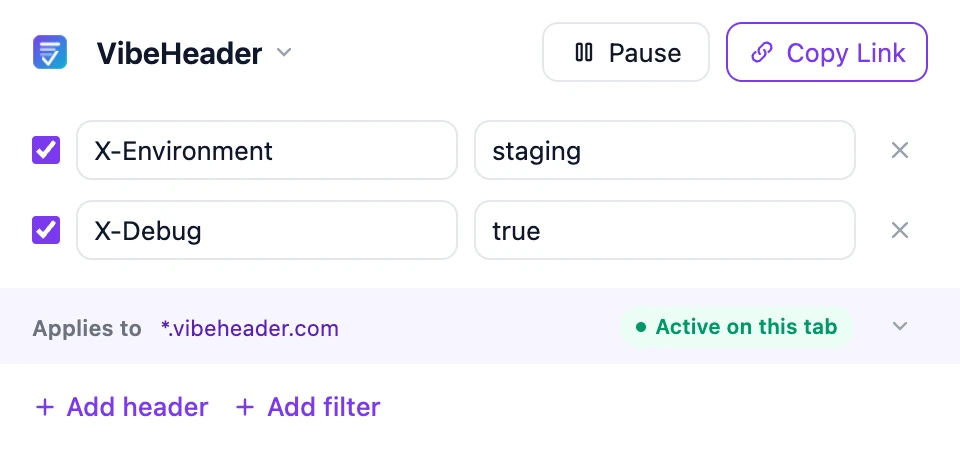
The common case
There is no special migration process for a simple setup. Open both extensions, copy the values across, and test once.
Paste each enabled request header name and value into VibeHeader.
If you use Request URL Filters, add the same host, URL, wildcard, or regex expressions.
Reload your page and confirm the header on the actual request in DevTools → Network.
You do not need to export JSON, learn the share format, or rebuild anything else.
Multiple Profiles or several URL-scoped setups: continue with the detailed guide below.
Response Headers, Cookies, CSP, Redirects, or broader filter types: these do not map directly today. Tell us what you need and we will evaluate the use case.
Detailed guide
Move the Profile you use most, verify it, then repeat the same pattern for the rest. The extra steps below are only for users with a larger setup.
Use ModHeader’s export action to download the Profiles as JSON. VibeHeader cannot import that file natively yet, but it gives you a reference for a manual migration—or an input you can redact before asking a coding agent to create VibeHeader import links.
A coding agent such as Codex or Claude Code can translate the supported parts of a redacted ModHeader export into VibeHeader’s documented share format. Each link carries one Profile; open it, review the preview, then import it with one click.
Replace every header value—not only obvious tokens—with a placeholder such as __REPLACE_LOCALLY__. Also redact internal Profile names, hostnames, paths, or Filter expressions when they reveal sensitive infrastructure. VibeHeader’s server never receives the #c=… payload, but that privacy boundary does not protect data pasted into a coding agent or chat.
VibeHeader v2 payload
{
  "v": 2,
  "n": "Staging API",
  "h": [
    [
      "X-Environment",
      "__REPLACE_LOCALLY__"
    ],
    [
      "Authorization",
      "__REPLACE_LOCALLY__"
    ]
  ],
  "f": [
    [
      "api.example.com",
      true
    ],
    [
      "^https://api\\.example\\.com/v[12]/",
      true
    ]
  ]
}
Field map
v2.nh[name, value].f[expression, enabled].https://www.vibeheader.com/s#c=
+ URL-encoded JSON payload
I have attached a REDACTED ModHeader JSON export. Convert every compatible Profile into a VibeHeader v2 share link.

For each Profile, build exactly this payload:
{
  "v": 2,
  "n": "Profile name",
  "h": [["Header-Name", "value"]],
  "f": [["request filter expression", true]]
}

Rules:
- h: include enabled request headers only. Preserve names, values, order, and placeholders exactly.
- f: include supported Request URL filters only. Preserve each expression and enabled boolean.
- Create one payload and one link per Profile.
- Build each link with:
  "https://www.vibeheader.com/s#c=" + encodeURIComponent(JSON.stringify(payload))
- Do not convert response headers, cookies, CSP, redirects, Exclude URL filters, tab or tab-domain filters, window filters, or resource-type filters.
- Do not guess or invent an equivalent for unsupported rules.
- Do not change or reconstruct any redacted value.

Output:
1. One complete VibeHeader link per compatible Profile.
2. A "Not converted" list naming every skipped rule and why it was skipped./s.Create names that make the active scope obvious—such as Local Debug, Staging API, or Checkout QA. Profiles keep their own headers and Request Filters, and more than one can be active at the same time.
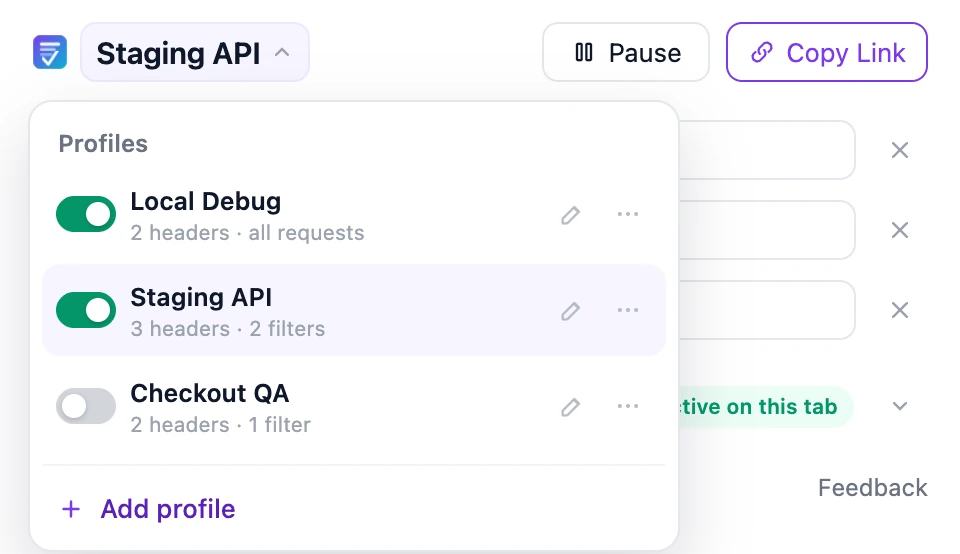
Add each request header to its matching Profile and preserve the enabled state. Work from one Profile at a time so similarly named environments do not inherit the wrong token or flag.
X-EnvironmentstagingX-DebugtrueSensitive value? Keep it local, avoid screenshots, and rotate it if it may have been exposed through an old extension or shared link.
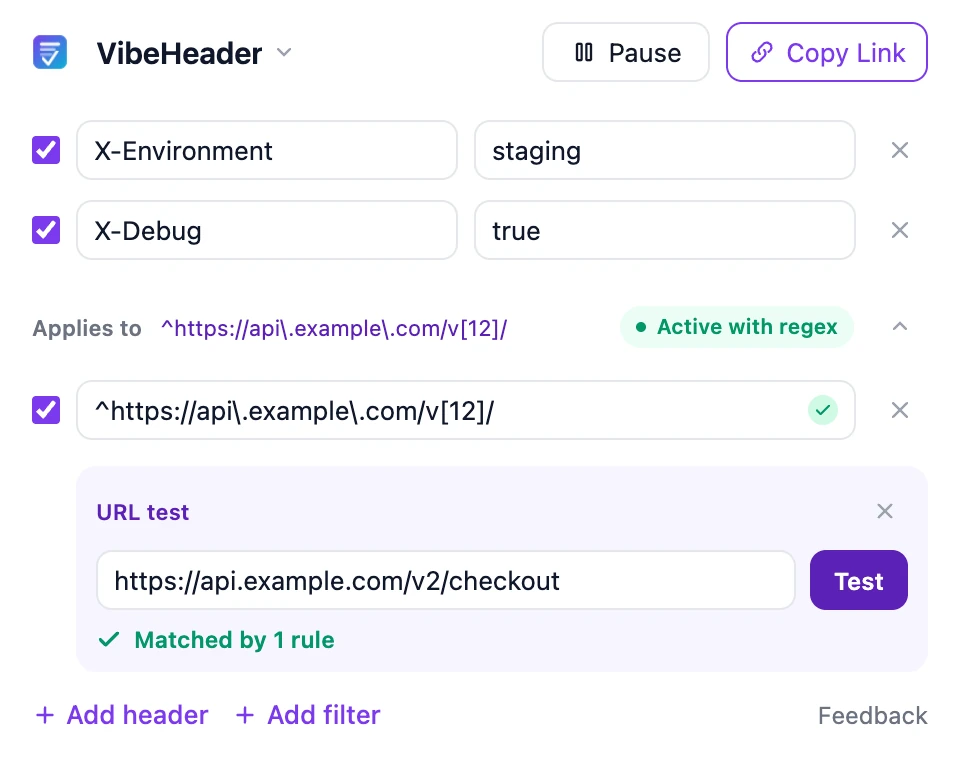
VibeHeader Filters match the target URL of each supported request—not simply the page in the address bar. Choose the simplest expression that describes the intended traffic, then test a real API or asset URL before relying on it.
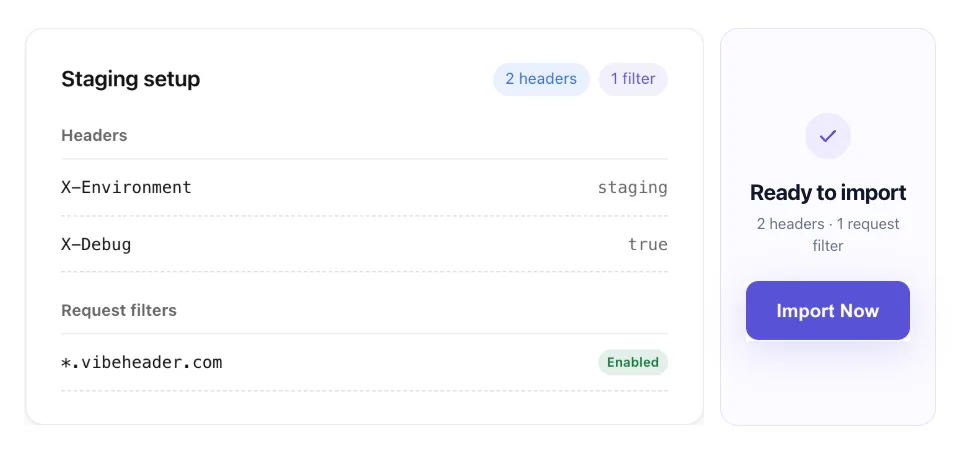
A VibeHeader link can include one Profile’s suggested name, enabled valid headers, and valid Request Filters. The recipient previews the setup before importing it as a new Profile.
Confirm the intended Profile, header rows, and Filters are enabled.
Reload the target page and open DevTools → Network.
Select the actual API or asset request and inspect Request Headers.
Visit a non-matching URL and confirm the sensitive header is absent.
Do not stop at a positive match.A negative test catches filters that are broader than the original ModHeader scope.
Help shape migration support
Tell us which ModHeader rule, filter, or workflow is blocking your move. We will review the use case and evaluate whether it should be supported in VibeHeader.
FAQ
There is no native ModHeader JSON importer today. You can migrate manually, or give a redacted export to a coding agent and ask it to generate VibeHeader v2 share links. VibeHeader does not receive the export or the URL fragment, but the coding agent can read anything you provide to it, so redact header values, internal URLs, and sensitive names first.
It matches each supported request’s target URL, which can differ from the URL in the address bar. Use the built-in URL tester with the exact API or asset URL you expect to receive the header.
Yes. Profiles can be enabled independently, so a local debugging Profile and a staging API Profile can run at the same time.
Keep the existing rule in a tool that supports it, and submit your workflow through the migration feedback form. We will review the use case and evaluate whether it belongs on the VibeHeader roadmap.
The Profile payload is stored after the # in the URL fragment, which browsers do not send to the VibeHeader server. The complete link still contains the configuration, so send it only through a trusted channel.
Ready to move one Profile?
Install VibeHeader, rebuild one Profile, test its target request, and use that verified setup as the pattern for the rest.