Requestly vs VibeHeader for Header Editing
You usually open a header editor in the middle of another task. Staging needs an auth header, or a local frontend needs to impersonate one tenant. You want to add the value, limit it to the right URL, reload, and get back to the bug before you lose your train of thought.
I built the same URL-scoped rule in both extensions and then asked a local server what arrived. Both got the network request right. Requestly took me through a full Rules dashboard, while VibeHeader kept the header, its URL scope, and the active state in one popup. That difference is easy to miss in a feature list and hard to miss when you are already thinking about a bug.
One header, one route, and a result the server could verify
I started each extension with no imported configuration. The job was small enough to explain in one sentence. Add X-Comparison-Demo: active when the URL contains a local /matched path, and leave /outside alone.
I picked this rule because it resembles everyday environment switching and leaves little room for a subjective verdict. The final request either contains the header or it does not. The interesting part is everything each product asks the developer to do before that request succeeds.
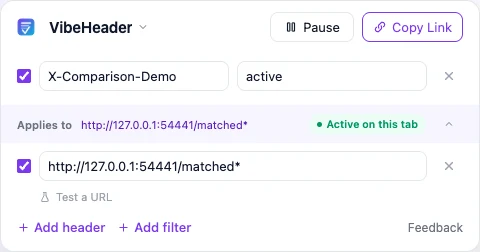
VibeHeader kept the whole job in one popup
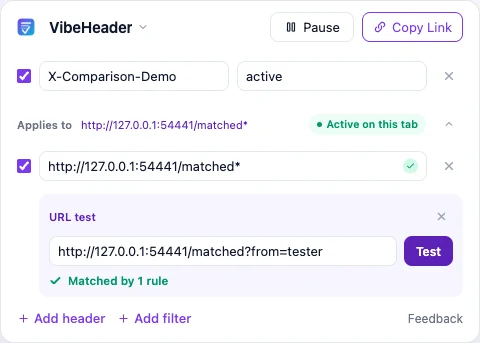
I opened the toolbar popup and the two fields I needed were already there. I entered the header name and value, added a URL Filter directly below the Profile, and pasted the local matched path. The popup showed that the Profile was active on the current tab. Expanding the URL test confirmed that the exact test URL matched one rule.
Because the extension is built around browser request headers, there was no rule-type decision before the work began.
Requestly opened a full Rules dashboard
Requestly opened on its Rules dashboard. Before I reached the header editor, I could see redirects, response overrides, templates, imports, API tools, and an optional account prompt. I skipped sign-up and selected Add/Remove header.
Once the Modify Headers editor was open, the work was clear. I kept the default URL Contains condition, entered the local path, chose Add Request Header, filled in the same name and value, and saved the rule. Requestly generated a rule name for me, which was good enough for this test.
The editor itself was understandable. Most of the extra thinking happened around it. Requestly asked me to identify the right tool, then presented request and response tabs, Add and Remove actions, Filters, conditions, and the neighboring rule catalog. Those controls are useful when a project also needs redirects or response overrides. For this single header, they were things I had to scan before I could move on.

I trusted the server, not the green badges
Both products include UI that helps check matching. I used a local echo server as the final judge. Each extension sent a real request to /matched and another to /outside. The server received X-Comparison-Demo: active on the first route and reported the header as absent on the second.
activeHeader received absentHeader withheld activeHeader received absentHeader withheld Normalized results from the same local echo server test. The product screenshots above show the configuration experience; this table keeps the network result in one visual format so neither interface gets presentation credit.
Requestly is building much more than a header editor
The Requestly homepage now leads with designing, building, and testing APIs. Its wider product covers an API Client, Postman collection imports, collections, environments, scripts, tests, mocks, redirects, HTTP rules, sessions, and workspaces. The browser extension remains a lighter, browser-focused product, while its separate desktop app handles system-wide interception.
That breadth explains what I saw during setup. A developer looking for a Postman or Charles Proxy alternative may want those tools in one place. The Rules dashboard becomes a launch point for many kinds of debugging work.
VibeHeader's popup contains the parts of this one job. Profiles separate local, staging, and production setups. URL Filters decide where they run. The URL test stays under the same Profile, and advanced matching appears when the user opens it.
Developer-grade power with iPhone-like simplicity.
A developer can understand advanced controls. Good interaction design means the common job works before those controls demand attention.
Choose based on the work surrounding the header
I would choose VibeHeader for the developer who mainly needs browser request headers across local, staging, production, projects, or customers. The Profile model is easier to remember, the active state stays visible, and URL matching can be checked where the configuration is written.
I would keep Requestly when header modification belongs to a larger interception workflow. Response headers, body overrides, redirects, mocks, scripts, request cancellation, API collections, and desktop interception justify the rule system and its extra concepts.
VibeHeader cannot replace every Requestly workflow. It offers a cleaner replacement for the part many developers use most often. That narrower claim is the one the hands-on test supports.
What each product covers
Available · Not available · Deliberately outside the product's focus
Swipe horizontally to compare both products.
| Workflow or scope | VibeHeader 1.1.1 | Requestly 26.7.27 and current platform |
|---|---|---|
| The browser header workflow | ||
| Add or replace request headers | ✓ | ✓ |
| Scope a rule by URL | ✓Domain, URL, wildcard, or regex | ✓URL operators and advanced conditions |
| Create the tested local rule without an account | ✓ | ✓ |
| Complete the tested setup inside the toolbar popup | ✓Header, Filter, and active state together | ✕Configuration opens in the Rules dashboard |
| Group several headers and URL conditions into one reusable setup | ✓One Profile holds headers and Filters | ✓One rule can contain multiple modifications and conditions; related rules can also be grouped |
| Share a reusable header setup | ✓Review-before-import Profile link; no account required | ✓Share Rule links, exports, or shared projects |
| Different product boundaries: focused header tool vs interception platform | ||
| Remove request headers | —Focused on adding and replacing request headers | ✓ |
| Modify response headers | —Request-header workflow by design | ✓ |
| Redirect requests or override bodies | —Keeps the extension centered on headers | ✓ |
| API mocks and scripts | —Not an API debugging suite | ✓ |
| API Client and Postman collection import | —No bundled API client | ✓ |
| System-wide desktop interception | —Browser extension only | ✓ |
VibeHeader has the shorter header workflow. Requestly has the wider debugging and API platform. The better choice depends on which side of this table describes your actual week.
Not every Requestly alternative is another header extension
Someone searching for a Requestly alternative may be replacing a different part of the product. I would keep the shortlist tied to the job:
- Header Editor if you still want a browser rule engine and also need response changes, redirects, cancellation, or custom functions supported by the relevant build.
- Hoppscotch or Bruno if the real job is sending API requests, managing collections and environments, or replacing an API client.
- HTTP Toolkit or mitmproxy if you need to inspect and rewrite traffic beyond one browser extension, including applications, devices, or system-level clients.
I did not run those products through this head-to-head test. They are included to separate adjacent use cases, not to rank tools I did not test here. If request headers are the only part of Requestly you use, VibeHeader is the alternative this comparison is about.
The screenshots come from working rules
I loaded VibeHeader 1.1.1 in a clean Chromium profile on August 13, 2026. I installed Requestly 26.7.27 from the Chrome Web Store in a dedicated Chrome profile and repeated the test on August 31. In both browsers I created the same rule from scratch and sent requests to the same local echo server.
The screenshots record what I saw in each installed extension. The server responses establish whether the header reached the matched route and stayed away from the outside route. I also checked Requestly's rule types, Postman import, API Client, and browser-versus-desktop model against its current official pages and documentation.
This test covers setup, scoping, and the resulting network request. I did not benchmark memory use, CPU use, extension size, or rule throughput, so the comparison makes no performance claim in those areas.
Primary sources
- Requestly homepage - current API Client positioning and Postman migration emphasis.
- Requestly API Client - testing, mocking, interception, collections, environments, and scripts.
- Requestly's ModHeader comparison - Requestly's own explanation of going beyond headers.
- Browser extension vs desktop app - official separation of browser and system-wide workflows.
- Requestly projects and workspaces - how rules, mocks, API requests, and collections are organized.
- Requestly sharing and rule permissions - official support for rule groups, imports, exports, shared projects, and public links.
- Requestly HTTP Interceptor source and VibeHeader source.
Frequently asked questions
What is the best Requestly alternative for editing browser headers?
VibeHeader is a focused alternative when you mainly need browser request headers, Profiles, URL Filters, URL testing, and account-free sharing. Requestly is the better fit when the workflow also needs mocks, redirects, scripts, response changes, or API testing.
Who is VibeHeader best for?
VibeHeader is best for developers who repeatedly switch request headers across local, staging, production, projects, or customers. Each reusable Profile keeps its headers, URL scope, active state, and sharing path close together, so the setup remains easy to see, test, and pause.
Does VibeHeader support response-header modification or header removal?
Not today. VibeHeader 1.1 focuses on adding and replacing browser request headers. If response-header editing, request-header removal, or another interception workflow matters to your work, share the use case through the existing feedback form. Please do not include private URLs, tokens, or header values.
Can VibeHeader bypass CORS?
Not by rewriting the server's CORS response. VibeHeader can add request headers, but it does not modify Access-Control-Allow-Origin or other response headers. Use a response-header tool, a local proxy, or correct the server configuration for that workflow.
When should I keep using Requestly?
Keep Requestly when you regularly modify response headers, redirect requests, override bodies, run mocks or scripts, test API collections, or intercept traffic outside the browser. Those jobs use the breadth that made the simple header setup feel heavier.
Can I migrate a Requestly rule to VibeHeader?
A simple request-header rule can usually be recreated as a Profile with one or more URL Filters. Requestly-specific response rules, redirects, mocks, scripts, body changes, and advanced non-URL conditions do not map directly.
If this is the kind of header work you do
VibeHeader keeps the common path direct. Open the popup, add a header, choose where it applies, and return to the work that brought you there.