Local development
Keep localhost tokens and debug flags away from deployed environments.
Keep each project or environment as a named setup. Turn Profiles on and off without rewriting header rows every time your context changes.
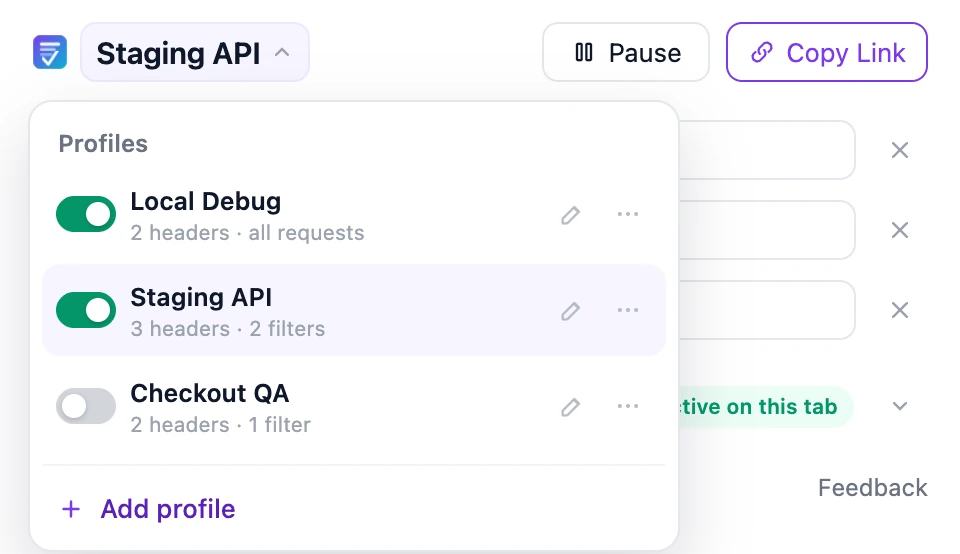
Each Profile keeps its own name, request headers, enabled state, and Request Filters. The popup always shows which setup you are editing.
Keep localhost tokens and debug flags away from deployed environments.
Save the environment headers your team uses repeatedly and scope them to the right hosts.
Turn a checkout or feature-flag setup on for a test, then disable it without deleting the work.
All active Profiles can run together. For each request, VibeHeader first checks the Profile filters, then combines the matching header rules.
Profiles are saved with chrome.storage.local. There is no VibeHeader account, cloud workspace, or extension analytics. When a teammate needs one setup, share that Profile by link and let them review it before import.
Yes. VibeHeader combines every active Profile whose Request Filters match the request.
The later Profile in the Profile list takes priority for that header. VibeHeader shows an override warning so the result is visible before you browse.
No. Profiles are stored locally in chrome.storage.local. VibeHeader does not require an account or provide cloud sync.
Yes. Pause is the global off switch. Individual Profile toggles let you keep VibeHeader running while enabling only the setups needed for the current task.
A VibeHeader share link contains one Profile at a time, including its enabled valid headers and valid Request Filters.