Header comments · Reordering
VibeHeader 1.2: Keep Context With Every Header.
Label a Header by country, environment, or purpose, move the rows you reach for most, and carry that context into a shared setup.
Label a Header by country, environment, or purpose, move the rows you reach for most, and carry that context into a shared setup.
Two of the requests we have heard most often from the VibeHeader community recently were simple: let me note what each Header is for, and let me put the rows I use most where I can find them.
Those requests tend to appear after a setup grows. A request-header list starts with one row; a few weeks later, it contains staging, QA, backup values, and several X-Forwarded-For entries for different test countries or exit nodes.
Header Comments
Add a short note to explain what a Header value represents: “US test IP,” “Germany exit node,” “Singapore QA,” or “Backup value.” Comments are hidden by default, so the normal editing view stays compact. Open the Profile title menu and choose Display → Show comments when you need the extra context.
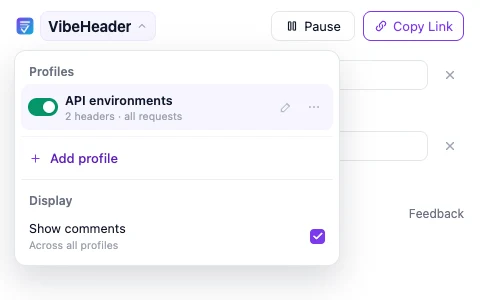
When a setup with non-empty comments is imported for the first time, VibeHeader reveals them if you have not chosen a preference yet. If you deliberately hid comments, an import respects that choice.
Comments are single-line notes. Consecutive line breaks from imported or older data are normalized to spaces. They are description text only: VibeHeader never sends a comment as an HTTP Header.
Header order
A Profile with test values for several countries is easier to scan when the region you use today sits near the top. Enter Reorder headers, then move whole rows with drag-and-drop or focus a handle and use Arrow Up, Arrow Down, Home, or End.
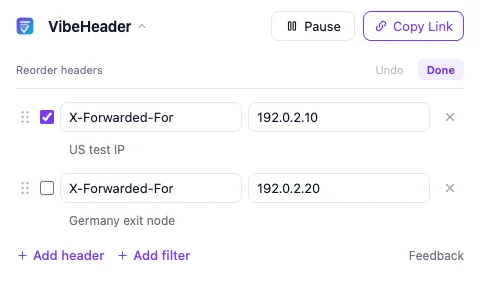
Reorder headers with drag-and-drop or the keyboard, with Undo while arranging them. Undo belongs to the current sorting session; after Done or exit, there is no global reorder history.
Within one Profile, the last enabled, valid Header with the same case-insensitive name still wins. Moving two enabled duplicates can therefore change the value applied to requests. If only one duplicate is enabled and the others are disabled backups, moving that enabled row does not change the effective value.
Sharing with context
When you share a Profile, VibeHeader includes the order you arranged and the comments for its enabled, valid Headers. Comments remain part of the setup even when their fields are hidden in the sender's popup, so a teammate can review the “why” before importing.
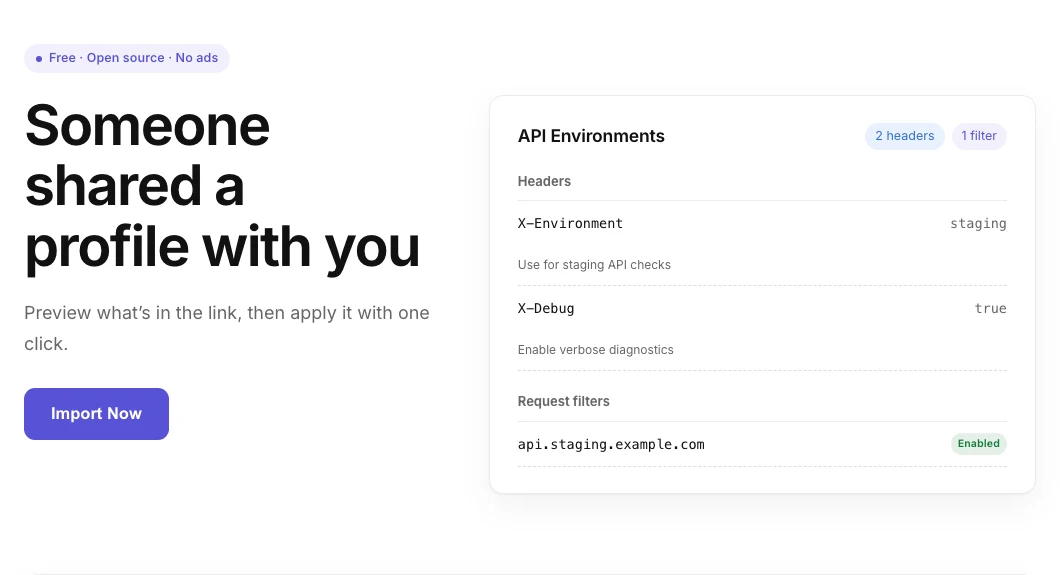
VibeHeader 1.2 imports comments, Header order, and Request Filters together. VibeHeader 1.1 can still import the ordered Headers and Filters, but comments are omitted—and the share page tells you before importing. Older versions are never allowed to drop a Request Filter silently and apply Headers more broadly.
Privacy and permissions
FAQ
Use a short, single-line note to recognize a row later: “US test IP,” “Germany exit node,” “Singapore QA,” an account, an owner, or the reason a backup exists. The label is descriptive only; VibeHeader does not infer or verify the country.
No. Comments remain local description text attached to a row. They are never added to the outgoing request as a Header name or value.
It can. When multiple enabled, valid rows use the same case-insensitive Header name, the last one in the Profile wins. Moving those enabled duplicates can therefore change the effective value.
VibeHeader 1.1 can import compatible Header order and Request Filters, but it cannot retain comments. The share page explains that limitation before import and never removes a Filter silently.
Built with the community
Header Comments and reordering came from the requests we heard most often from the VibeHeader community. If a Header workflow still feels repetitive, unclear, or unsafe, tell us—we read every response.
VibeHeader 1.2.0 is now available from both the Chrome Web Store and Microsoft Edge Add-ons. Existing store installations normally update automatically, and the complete production source remains public to inspect.