How to Remove the ModHeader Malware and Clean Up What It Left Behind
In early July 2026 Google flagged ModHeader v7.0.18 as malware and Microsoft pulled it from the Edge store, after researchers reported it shipped a hidden data-collection SDK. This is a plain, no-drama cleanup checklist: confirm if you're affected, remove it, wipe the leftovers on Mac and Windows, and lock down what it could have touched.
This guide is written to be useful whether or not you end up using VibeHeader. Everything about ModHeader below is attributed to Google, Microsoft, and the independent researchers linked in Sources — none of it is our own analysis. If Chrome or Edge has already disabled the extension for you, that's a good sign the cleanup below applies to you.
Short on time? The essential moves, in order (details below):
Remove the extension from Chrome and Edge.
Delete its leftover storage folders on Mac or Windows.
Block api.stanfordstudies.com at your DNS or hosts file.
Rotate any secrets you pasted into it.
What was reported (the 60-second version)
In early July 2026, Google flagged ModHeader as malware and disabled it, and Microsoft removed it from the Edge Add-ons store (around July 3; the Chrome listing was down by ~July 10).
Researchers reported that ModHeader build 7.0.18 bundled a hidden SDK — hidden inside a file disguised as a date library (dayjs.min-*.js) — that collected the domains you visited, AES-GCM–encrypted them, and POSTed them once a day to a third-party collector at api.stanfordstudies.com/app/log (a site titled "Stanford Studies" with no actual link to Stanford).
Reported scale: roughly ~900k Chrome installs plus ~700k on Edge (~1.6M combined). Some write-ups cite the ~800k Chrome figure alone.
Important nuance: researchers said the collector shipped dormant behind an empty allowlist — so in their testing nothing was sent out — but the endpoint, key and scheduler were all present and could be switched on by a future update. So this is best treated as a serious exposure risk, not a confirmed mass leak.
If you still have ModHeader installed, the widely recommended step is to remove it. Here's how to do that cleanly.
Step 1 — Confirm whether you're affected
Open chrome://extensions (and edge://extensions if you use Edge) and turn on Developer mode so version numbers show.
Name: ModHeader — Modify HTTP headers
Extension ID:idgpnmonknjnojddfkpgkljpfnnfcklj
Flagged version:7.0.18 (if you're on this build, treat yourself as affected)
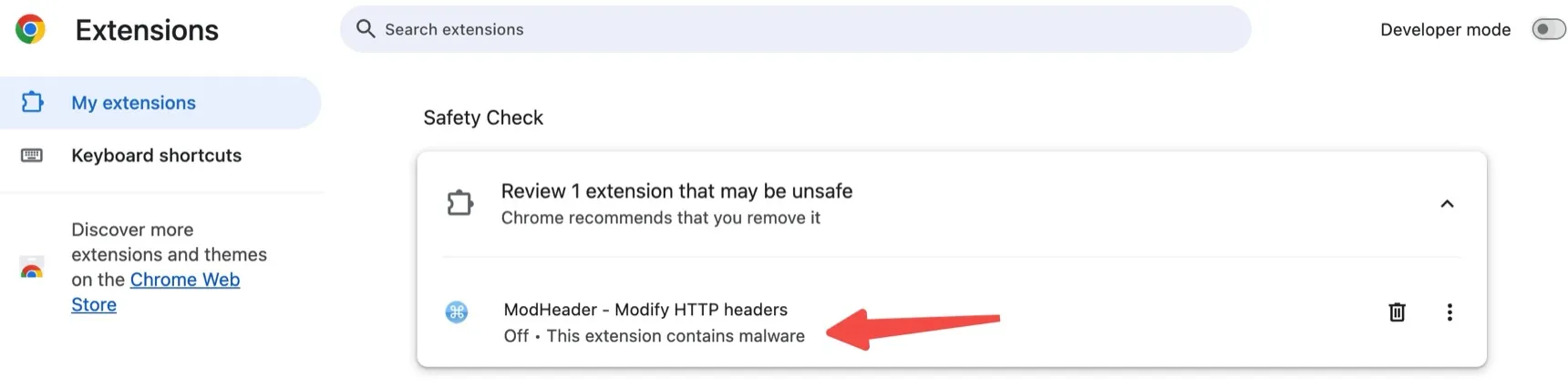
If Chrome's Safety Check already shows "This extension contains malware", you're in the right place — don't just click away the warning; finish the cleanup below. Here's the actual warning to look for:
Chrome's Safety Check flagging ModHeader as malware and recommending removal.
Step 2 — Remove the extension (Chrome and Edge)
Go to chrome://extensions → find ModHeader → click Remove → confirm. Repeat at edge://extensions.
If the browser already disabled it, leave it disabled and still click Remove — disabling stops it running but does not delete its cached data.
Do this in every browser profile where you had it installed (each Chrome profile is separate).
Step 3 — Delete the leftover local storage
Uninstalling usually clears most of this, but the extension's cached data — which researchers reported could grow to well over 100 MB of stored request/response headers, potentially including tokens and cookies — can linger. To be thorough, delete any of these folders that still exist. Replace Default with your actual profile folder (also check Profile 1, Profile 2, …).
macOS
Under ~/Library/Application Support/Google/Chrome/ (and the Edge equivalent under Microsoft Edge):
Fully quit the browser before deleting these folders, or the files may be locked.
💡 Tip: hand the sweep to a coding agent. If you use a coding agent such as Claude Code or Codex, paste this guide's URL (or the folder list above) into it and ask it to locate and remove the leftover ModHeader folders across all your browser profiles — especially useful when you have several profiles and worry about missing one. Two safety notes: fully quit the browser first, and have the agent list what it found and wait for your confirmation before deleting anything.
Step 4 — Block the exfiltration domain
Block and log the collector so nothing can reach it, even from a stray cached copy:
Individuals: add 0.0.0.0 api.stanfordstudies.com to your hosts file (/etc/hosts on macOS/Linux, C:\Windows\System32\drivers\etc\hosts on Windows), or block it in your DNS resolver / Pi-hole.
Teams: add api.stanfordstudies.com (and the parent stanfordstudies.com) to your DNS blocklist / egress firewall, and search proxy and DNS logs for any historical POST /app/log to that host.
Step 5 — Rotate anything sensitive you fed it
Because the extension could read and store the headers flowing through your browser, treat anything you routinely pasted into it as potentially exposed and rotate it:
Authorization / Bearer tokens and API keys used in header configs.
Session cookies you set via headers for testing.
Any internal hostnames or staging credentials that lived in your header sets.
This is precautionary given the reported dormant state — but rotating a token is cheap insurance compared to assuming it's fine.
Indicators of compromise (for security / IT teams)
Hunt across managed endpoints for the following. The strongly corroborated indicators are the extension ID, version, exfil endpoint, and disguised filename; items marked (as reported) come from the original reverse-engineering write-up and are included for completeness.
Type
Indicator
Extension ID
idgpnmonknjnojddfkpgkljpfnnfcklj
Version
7.0.18
Network (exfil)
outbound POST to api.stanfordstudies.com/app/log
Domain
api.stanfordstudies.com, stanfordstudies.com
Disguised file
dayjs.min-*.js (data-collection SDK)
Related file (as reported)
background-94ad634d.js
Hardcoded AES key (as reported)
aWfU3yG_wksZaQdSnxPJBOId0cAN8KK/UIlZbli7-bE
Fingerprint salt (as reported)
mod盐header
Reported behavior: domain-only collection (not full URLs, not cookie values, not passwords), AES-GCM encryption, one batched upload per day on a per-device randomized schedule, and no remote-code-execution / no external script loading.
FAQ
Was my browsing data actually stolen?
Per the researchers who reversed build 7.0.18, the collector shipped dormant behind an empty allowlist, so in their test environment nothing was sent out. But the endpoint, key and scheduler were all present, so a later update could have activated it. Treat it as a real exposure risk rather than a confirmed leak: remove it, clear its data, and rotate secrets you pasted into it.
Chrome already disabled it — am I done?
Not quite. Disabling stops it from running but doesn't delete its locally cached data (reported to reach well over 100 MB of stored headers, tokens and cookies). Remove it fully and delete the leftover storage folders in Step 3.
Which version was affected?
Researchers attributed the hidden SDK to build 7.0.18 (ID idgpnmonknjnojddfkpgkljpfnnfcklj). Google flagged and disabled it and Microsoft pulled it from Edge in early July 2026.
What should I use instead?
Choose a focused Manifest V3 header editor with public source, understandable permissions, local configuration storage, and no ads or extension analytics. VibeHeader is public and MIT licensed, with Profiles, Request Filters, and review-before-import sharing; Requestly and Header Editor remain maintained options when you need a broader rule engine.
Choose a replacement you can verify
You'll still need to modify headers for testing, so look for public source, understandable permissions, local configuration storage, a focused feature set, and no ads or extension analytics.
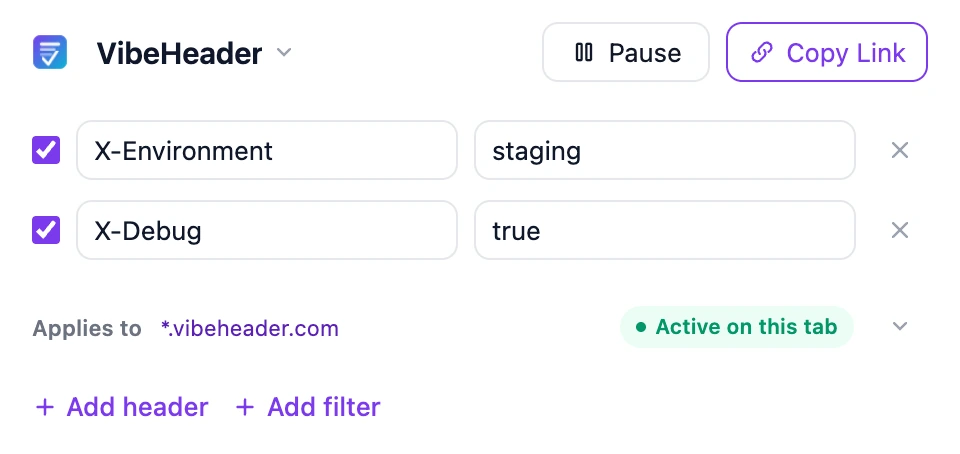
VibeHeader follows that checklist. Its source is public and MIT licensed. Request Filters keep headers on the sites they are meant for, Profiles keep projects separate, and Copy Link shares one complete setup for review before import. The configuration stays after # in the share URL, which browsers do not include in the request for the /s page. The complete link still contains the configuration, so share it through a trusted channel. For the fuller story and other maintained options, see the founder's take and the ModHeader alternatives comparison.
VibeHeader 1.1 keeps request headers scoped to the intended site and shares the complete setup from the same popup.
All claims about ModHeader on this page are attributed to Google, Microsoft, and the researchers linked above. Indicators marked "(as reported)" originate from the HackIndex write-up and were not independently re-verified by us.