Blog · By Kai, founder of VibeHeader · July 12, 2026
ModHeader Was Flagged as Malware. I'm Not Surprised. Here's Why I Built VibeHeader.
This morning Chrome told me ModHeader had been flagged as malware. I'd been expecting a moment like this for a year. Here's the honest story.
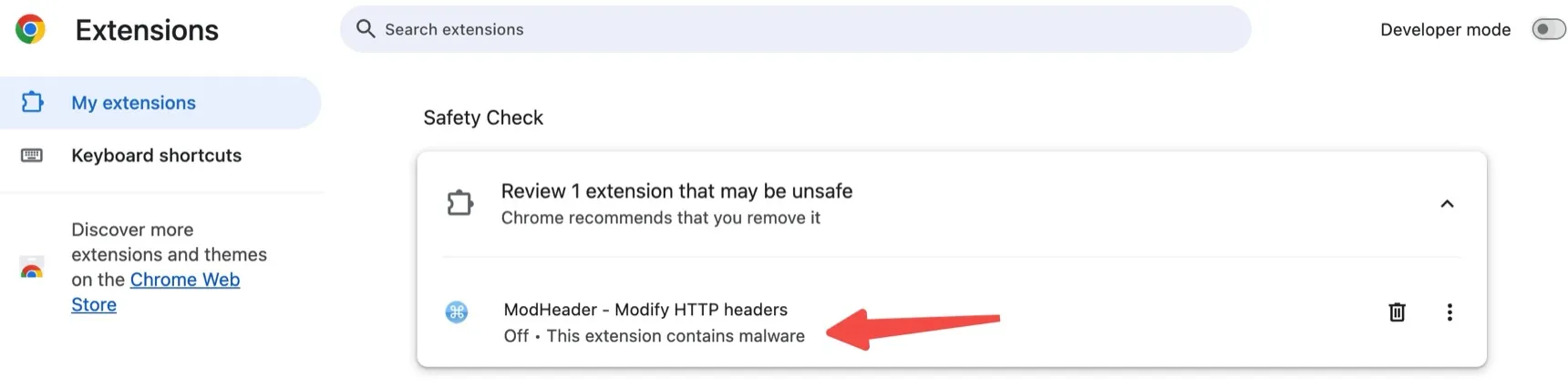
I opened Chrome this morning and the browser was already talking to me: ModHeader had been flagged as malware and disabled. My first reaction wasn't shock. It was a quiet "yeah, that tracks."
The actual warning Chrome showed me this morning: ModHeader, disabled, “This extension contains malware.”
I'm Kai. I build VibeHeader, a small, focused extension for editing and sharing HTTP headers. I built it about a year ago, largely because of the exact concerns that seem to be behind today's news. So this post is two things: a plain summary of what actually happened, attributed to the people who reported it, plus my honest, first-person account of why I stopped trusting ModHeader long before Google did.
What actually happened
Here is what has been reported by Google, Microsoft, and independent security researchers. None of this is my own finding:
In early July 2026, Google flagged ModHeader as malware and disabled it, and Microsoft removed it from the Edge Add-ons store (around July 3, 2026).
Security researchers reported that ModHeader build 7.0.18 shipped a hidden spyware SDK that collected the domains users visited and sent them, encrypted, to a third-party collector (stanfordstudies.com), with no notice and no opt-out. That part is separate from any disclosed ads. Earlier reviews had also reported adware and affiliate-tab behavior.
Across the Chrome (~900k) and Edge (~700k) listings, that's roughly 1.6 million affected users.
Full links are in the Sources section at the bottom. If you still have ModHeader installed, the widely recommended step is to remove it.
Why I'm not surprised: the three things that pushed me to build my own
Where I work, teams are constantly testing and doing QA across a lot of different staging and test environments. Everyone used ModHeader to carry the header configs for those environments around. It did the job, until three things wore me down.
1. Sharing was painful. People passed environment configs around however was fastest: plain text in Slack and emails, or a quick screenshot when that felt easier. Either way, to actually use one I'd open ModHeader and hand-type each value into the form, one field at a time. It was tedious and easy to get wrong. One trailing space, a lowercase "l" that was really an uppercase "I," and you'd lose twenty minutes chasing a request that failed for no visible reason.
2. Unwanted promo popups. Every so often, a new browser tab or window would open on its own with a promotional page for some other product. For a while I couldn't pin down the cause. But I run several Chrome profiles, and I noticed the popups only ever appeared on the profiles where ModHeader was installed. After I removed it from one of those profiles, the popups stopped there completely. That's what led me to conclude ModHeader was responsible. I want to be clear that this is my own observation from isolating it across profiles, not a lab result. But it was consistent enough that I trusted it.
3. Over-broad permissions. The extension asked for a wide set of permissions, and I had no real way to tell what it might be doing in the background. When something can read and modify your web traffic and also occasionally opens promo tabs, "just trust it" stops feeling like an acceptable answer.
What I actually wanted
None of my frustration was really about headers. What I wanted was a dead-simple way to share environment info so a teammate could apply it in one click, the way you'd drop something in Notion or a Google Doc and everyone's just on the same page. The lightest possible way to sync an env config, with zero privacy worry.
That became the whole design goal of VibeHeader. You build a complete setup—Profile name, request headers, and Request Filters—then copy one link so a teammate can review and import it. The configuration stays after # in the share URL, which browsers do not include in the request for the /s page. The complete link still contains the configuration, so it should travel through a trusted channel. The preview masks common sensitive keys like tokens and cookies. No ads. No extension analytics. MV3-native and light.
An honest admission
I'll be straight with you, because a trust piece that oversells itself isn't worth much. VibeHeader started as a weekend hobby project. I built it about a year ago to scratch my own itch. The people around me started using it, liked how lightweight and convenient it was, and passed it along to others on their own. That word of mouth is really all it's had: it's quietly grown to 5,000+ developers and counting, and I never spent real time promoting it.
So I'm not going to pretend VibeHeader is a big, battle-tested product with a polished team behind it. It's a focused tool, a weekend project that solved a real problem well enough that people kept sharing it.
What today reminded me
Seeing that malware warning this morning didn't feel like vindication so much as a reminder of something basic: building a product ultimately means respecting the people who use it: their experience, and their trust.
It's worth being honest about how an extension ends up flagged. It's usually not one villainous decision. It's a combination: closed-source code nobody outside can audit, permissions broader than the job requires, and steady monetization pressure on a free tool with millions of users. Put those together over enough time and "just a few affiliate tabs" can quietly drift into "a hidden SDK phoning home with the domains you visit." The users never agreed to that trade; they just couldn't see it happening.
The lesson I take from it is to keep the surface area small and the incentives clean: don't collect what you don't need, don't ask for permissions you don't use, and don't build a business model that only works if you quietly sell out your users.
An honest look at VibeHeader's permissions
Now that the source is public, let's put the manifest on the table. This is the production manifest.prod.json, in full:
storage — keeps your header configs on your device. Without it, everything would vanish when the browser restarts.
declarativeNetRequest — the core mechanism. The extension hands rules to Chrome and Chrome applies them itself. Unlike the older webRequest approach, the extension's code never sees your traffic.
declarativeNetRequestWithHostAccess — the companion piece that lets those rules actually modify headers instead of just blocking requests.
*://*/* host access — this is the scary-looking one, and every tool in this category asks for it (ModHeader and Requestly included). The alternative is making you approve each website by hand, every time you debug somewhere new — unusable for a tool whose whole job is "add a header on whatever site I'm testing." That's why the install prompt warns about "all websites": it's the honest cost of the feature, not a red flag by itself.
Earlier builds also requested activeTab. The audit found that VibeHeader did not use it, so version 1.1 removed it from the production manifest.
Google does review broad-permission extensions extra carefully. But here's the uncomfortable truth today's incident makes plain: review happens when a version is submitted — it can't tell you what the next update will do. An extension can pass review for years and then quietly change hands or change behavior. That is exactly the ModHeader story.
The only structural fix is full transparency: open source. Read the code, grep it for network calls (there are none), or build it yourself and load it unpacked. You shouldn't have to trust me — and now you don't have to.
If you're leaving ModHeader
Practical steps, in order (for a full, step-by-step version — including wiping the leftover local storage on Mac and Windows and an IOC table for security teams — see the complete ModHeader malware cleanup guide):
Remove the extension. If Chrome hasn't already disabled it, remove it from chrome://extensions (and from Edge). Consider rotating any secrets you routinely pasted into it.
When picking a replacement, look for: a small, focused feature set; MV3-native; no ads and no analytics; permissions you can actually reason about; and a sharing model that doesn't route your configs through someone else's server.
What VibeHeader does differently: public MIT-licensed source, local Profiles, precise Request Filters, a built-in URL tester, no ads or extension analytics, and one-link sharing that lets the recipient review the complete setup before import.
VibeHeader is now publicly available under the MIT license. You can inspect the source, requested permissions, storage model, and sharing implementation on GitHub. Trust should be verifiable, not something a browser extension asks you to accept on a landing page.
No pressure. If VibeHeader isn't the right fit, the comparison page lists other maintained options too.
FAQ
Is ModHeader safe now?
According to Google and Microsoft, no. In early July 2026 Google flagged ModHeader as malware and disabled it, and Microsoft removed it from the Edge Add-ons store. Security researchers reported that build 7.0.18 shipped a hidden SDK that collected the domains users visited and sent them to a third-party collector with no notice and no opt-out. If you still have it installed, the recommended step is to remove it and switch to a maintained, privacy-first alternative.
What is a safe ModHeader alternative?
Look for a focused Manifest V3 header editor with public source, understandable permissions, local configuration storage, and no ads or extension analytics. VibeHeader is public and MIT licensed, with Profiles, Request Filters, and review-before-import sharing. Requestly and Header Editor remain maintained options when you need a broader rule engine.
Why did ModHeader get flagged as malware?
Security researchers reported that ModHeader build 7.0.18 bundled a hidden spyware SDK that quietly collected the domains users visited and sent them, encrypted, to a third-party collector (stanfordstudies.com) with no notice and no opt-out. This was distinct from any disclosed ads, and earlier reviews had already reported adware and affiliate-tab behavior. On that basis Google flagged the extension as malware and Microsoft pulled it from the Edge store.
Figures and claims about ModHeader in this post are attributed to Google, Microsoft, and the researchers linked above. The observation about promotional popups is my own, based on isolating the behavior across Chrome profiles.